September 28, 2026 · Improvement — Platform
Clearer marketing site for makers
- The homepage now leads with who Kaniva is for: Your storefront and your shop floor, in one system. The subhead describes the build-to-order flow (customer files → quote → work order) before shipping and downloads.
- The Monthly price card now says outright that the base does not include Manufacturing, CRM or Accounting. The homepage and Pricing page both note that most makers start on Pay As You Go.
- The Kaniva vs Shopify page drops the "built for dropshippers" line. It adds a fair When Shopify is the better choice note and qualifies Shopify's 2% fee (it applies only when you don't use Shopify Payments), with a dated source link for the Shopify figures.
- Removed leftover copy ("Three rows here…", "Join entrepreneurs who trust Kaniva…"). Also removed the Integrations page's claim of "no per-transaction charges from us", which isn't true on Pay As You Go.
- Fixed: trial buttons on Features, About, Integrations, Compare and the blog dropped campaign (UTM) tags. Every trial link now keeps them.
- Trial clicks, hero clicks and migration requests are now tracked as analytics events.
September 28, 2026 · Feature — API
Order actions and shipping health on the admin API
- Fixed:
GET /api/v1/admin/orders/{id} returned a 500 for every order. It now returns the order with its items, customer, and shipment boxes (label and per-box tracking), plus a refund_gate block: refundable_amount, already_refunded, is_shipped, has_label, boxes, can_cancel, and can_refund. The order list accepts ?fulfillment_status=.
- Refund (
POST .../orders/{id}/refund, scope orders:manage) now refunds at Stripe or PayPal the same way the admin order page does — full when amount is omitted, partial otherwise, never more than what was captured, and only on completed, processing, or partially refunded orders. If the provider call fails nothing is recorded and the response is a 502; pass force=true to record a refund already issued in the provider dashboard. Cash orders are recorded and flagged manual_provider_refund_required.
- Cancel (
POST .../orders/{id}/cancel, orders:manage) follows the admin rule: pending or processing orders only. It revokes downloads and royalties and emails the customer unless notify_customer=false.
- New: Fulfillment (
PUT .../orders/{id}/fulfillment, orders:manage) marks an order shipped or delivered and records tracking (tracking_carrier, tracking_number, tracking_url, tracking_mode=add|replace). It stamps shipped_at / delivered_at, advances build-to-order lines, and registers the number with Shippo and PayPal when a carrier and number are given. The customer is emailed only when notify_customer=true.
- New scope: settings:read (group Settings under Settings → API).
GET /api/v1/admin/settings/shipping returns the ship-from address, rate source (Shippo or fallback), allowed countries, local pickup/delivery radii, and label/address-validation flags. GET /api/v1/admin/integrations/health returns checkout_ready plus configured flags for payments, shipping, Shippo, PrintNode, Google Maps, and the Stripe webhook secret. Secret values are never returned — only whether they are set.
September 28, 2026 · Feature — API
The admin API reports stock the way the product page does
GET /api/v1/admin/products and GET /api/v1/admin/products/{id} now include a stock block on every product: status (in_stock, out_of_stock, untracked, digital, build_to_order), in_stock, tracked, and qty_available. qty_available is the same number the storefront prints as "In Stock (N available)", and is null when the product has no count to give. An integration with the products:read scope can read availability here instead of scraping the storefront.- Each product also carries
sku (the product's SKU, stored as part_number), and the list accepts ?sku= to fetch one product by its own SKU or a variant's SKU.
- Fixed:
?search= on the product list errored on every request because it queried a column the products table does not have. It now searches name and SKU.
- products:read was already offered under Settings → API → Create Key and Edit; nothing changes there. Add it to an existing key with Edit and the new fields are available immediately.
September 28, 2026 · Feature — Admin
Setup walks a new store through payments and shipping before the first product
- A new store opens Setup instead of a product-first checklist. The order is store basics, accept payments, ship orders, first product, then preview.
- Accept payments starts with Connect with Stripe. Your own Stripe or PayPal keys are under Advanced on Setup and on Payment settings.
- Ship orders asks for the ship-from address and either a Shippo key or fallback rates. PrintNode and Google Maps stay under Later on the shipping page.
- Step 6, Integrations and API keys, collects every other key a store can enter on the same page: PrintNode, Google Maps, the Stripe webhook secret and, when CRM is on, VoIP.ms, transcription and ticket-triage keys. It is optional and never moves the five-step count.
- Settings → API Keys no longer errors on stores whose oldest key was saved in an older format.
- The dashboard and Setup show the same progress count. Settings → Webhooks opens a page instead of a missing page. PrintNode, CRM, API keys, and outbound webhooks are listed as later steps, not part of day one.
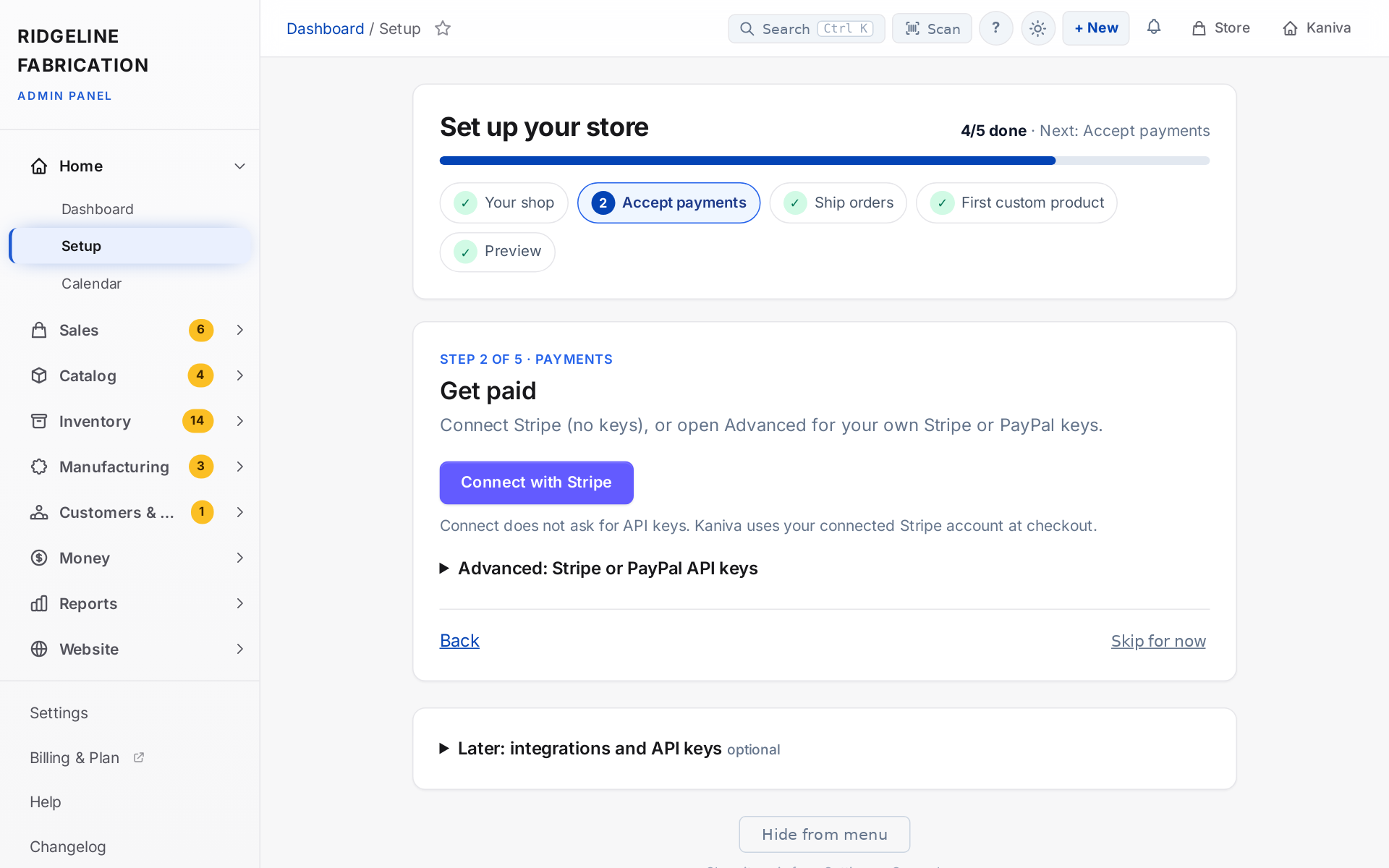 Setup: five steps from your shop's details to a preview, with Stripe connected in one click
September 26, 2026 · Change — Marketing site
Marketing site header and comparison on a phone
- On a phone, the marketing site header is one row: the Kaniva logo, a menu button, and a solid Start free trial button. The menu lists Home, Features, Pricing, Integrations, About, Blog, and Login. The trial button still opens
/register and keeps campaign parameters from the link you followed.
- How Kaniva compares on the homepage names Kaniva and Others on every row, so a phone no longer shows a feature list with the column headings scrolled off to the side. Full comparison still opens the Shopify comparison page.
- Wider screens keep the full horizontal menu, the same prices, and the same trial buttons.
September 26, 2026 · Change — Marketing site
Marketing homepage is a short path to the trial
- The public homepage now scrolls in one pass: who the store is for, proof from daily use, the two ways to pay, three comparison rows, then migration and security, then the trial button.
- The icon grid, the second pricing banner, the setup/security/analytics trio, the long product-type lists, the module catalog, and the full comparison table are off the homepage. That detail stays on Features and Kaniva vs Shopify.
- Prices are unchanged: Pay As You Go is $0/mo + 2% of sales, Monthly is $29/mo with a 0% platform fee, and Manufacturing, CRM, and Accounting are $25/mo each on Monthly. Card processing is still separate. Start free trial still opens
/register, with the 30-day trial and no card required.
September 25, 2026 · Change — Marketing site
Marketing trial path and fee wording
- Logged-out Start free trial buttons on the homepage and in the site header now go to the trial form at
/register. Campaign links keep their UTM parameters.
- Pay As You Go is described as $0/mo + 2% per sale. “0% transaction fees” is reserved for monthly plans, on the homepage and in the site footer.
- The trial form explains that the 30-day trial is full Pro, monthly plans take 0% of sales, and Pay As You Go at 2% per sale is a later choice.
- Section headings reached from an in-page link no longer sit underneath the sticky header.
- Homepage pricing is two doors: Pay As You Go ($0/mo + 2% of sales, everything included) or Monthly ($29/mo storefront, 0% platform fee, Manufacturing / CRM / Accounting at $25/mo each). No yearly discount toggle on that section. Card processing fees are described as separate.
September 25, 2026 · Change — Marketing site
Public pricing pages match the two-door homepage
- The public Pricing page no longer lists Starter through Business or a yearly “save 17%” toggle. It shows the same two monthly options as the homepage: $0/mo + 2% of sales, or $29/mo with a 0% platform fee and $25/mo each for Manufacturing, CRM, and Accounting. Card processing is called out as separate. The trial button goes to
/register.
- Terms no longer say Kaniva charges zero transaction fees on every plan. They describe the same two prices.
- The Shopify comparison, the features page, the transaction-fee blog post, and the create-store form no longer quote the old $19–$299 wall. Creating a store from that form does not charge a card and does not choose a plan yet.
September 25, 2026 · Feature — Store owners + Platform Admin
Choose Pay As You Go or Monthly, and buy add-ons, from your billing page
- Dashboard → Billing now shows the two ways to pay and your store's state: which door you are on, your add-ons, Stripe Connect status, next invoice and payment method.
- Pay As You Go ($0/mo + 2% of sales, everything included) is activated by completing Stripe Connect onboarding: the fee is collected on each sale through Connect, so a connected store counts as paid up. Without Connect, choose Monthly.
- Monthly ($29/mo, 0% platform fee, Advanced Inventory included) takes a card at checkout, where you can tick Manufacturing, CRM and Accounting ($25/mo each). Add or remove add-ons any time from the billing page: added add-ons are charged now, prorated; removed ones are credited on your next invoice. Everything is on one subscription and one invoice.
- Switching: Pay As You Go → Monthly is immediate. Monthly → Pay As You Go runs your paid period out first, then switches (you can undo until then). Cancelling keeps access until the period ends; after that the admin locks after 7 days unless you are on Pay As You Go with Connect live.
- During the 30-day trial every add-on is on. The yearly option is gone everywhere. Stores on retired plans (Starter…Business) keep them until they switch.
- Platform Admin → Tenant shows the door, subscription, Connect status and purchased add-ons; the add-on toggles are now labelled as overrides that win over billing. The add-on price under Settings mints matching Stripe prices when saved (
stripe:sync-addons does the same from the console).
September 25, 2026 · Change — Marketing site + Platform Admin
Public prices come from Platform Admin again
- The homepage, Pricing page, Terms, Features, the Shopify comparison, the transaction-fee blog post, the site footer, the trial form and the create-store form now read their prices from the plans table: the active $0 plan with a per-sale fee is quoted as Pay As You Go, and the active plan with slug
monthly (or the cheapest paid plan with a 0% fee) as Monthly. Edit them under Platform Admin → Plans.
- The per-add-on price (Manufacturing, CRM, Accounting) is a new field under Platform Admin → Settings → Public Pricing, default $25/mo. That card also shows which plans currently drive the site and warns when a door is missing.
- If a door is deactivated the pages drop that door's copy rather than showing a half-empty sentence; if no plan is active the pricing section shows a contact note.
- The free trial is now 30 days (it was 14 in code while the site said 30). The site quotes the same number everywhere.
September 21, 2026 · Change — Admin
VoIP.ms call sync paused
- The automatic every-five-minutes sync of call records from VoIP.ms is switched off for now. VoIP.ms had been timing out on every attempt, filling the logs with errors. Manually pulling calls with the
voip:sync-calls command still works, and the schedule can be turned back on with a single setting when we return to it.
August 19, 2026 · Feature — Storefront
Modern Industrial now styles your whole storefront
- The Modern Industrial theme previously styled the homepage, product page and cart, and quietly fell back to the Classic design everywhere else. It now draws every storefront page: the product catalogue with its filters and search, category pages, blog, custom pages, your customers' orders and account pages, downloads, support tickets, the booking pages, and the product landing page.
- That includes the pages customers reach from an email — paying an order balance, paying an invoice, tracking a shipment, confirming a booking, verifying a licence and leaving a review. These pages have no menu and no way back to the shop, so looking like a different company was the most confusing place for the old design to show through.
- Switching themes still changes appearance only. Products, orders, carts, payments, shipping, reviews and content are untouched, and you can switch back at any time.
August 19, 2026 · Feature — Storefront
Storefront themes
- Your storefront now has a theme — the overall design of your shop — and you can change it under Content → Storefront Theme.
- Two themes ship today: Classic, the original Kaniva storefront, and Modern Industrial, a bolder design aimed at manufacturers and enthusiast brands.
- Nothing changes unless you choose a new theme. Every existing store stays on Classic and looks exactly as it did.
- Switching themes changes appearance only. Your products, categories, customers, orders, inventory, pricing, cart, payment and shipping settings, reviews and blog posts are never touched, and you can switch back at any time.
- Each theme remembers its own settings, so trying another theme does not lose how you had the previous one set up.
- Preview a theme before committing to it: only you see the preview, and customers keep seeing your live storefront until you press Activate.
- Homepage sections you have built carry over between themes — the same content, drawn in the new theme's style. Sections can also be made specific to one theme.
- Modern Industrial now styles the product page and cart as well as the homepage, with a sticky order summary on the cart and a reworked product gallery. Everything those pages do — variants, build-to-order, stock requests, customisation uploads, deposits and reviews — works exactly as before.
- The existing colour, font, logo and banner controls are now labelled Content → Colours & Fonts (same page, clearer name) and continue to apply to whichever theme is active.
August 5, 2026 · Feature — Admin
Public booking link surfaced in the admin
- Calendar → Bookings now shows a "Your public booking page" card with the shareable booking URL, a Copy Link button, and an Open link. The main Calendar page header also has a Booking Page ↗ button. Previously the public
/book page existed but its URL wasn't visible anywhere in the admin.
August 5, 2026 · Feature — Admin
Active tickets count badge in the admin menu
- The Tickets entry in the admin sidebar (CRM section) now shows an orange count badge with the number of active tickets (status open or pending), matching the existing badges on Orders and Callbacks.
August 4, 2026 · Feature — Admin/Storefront
Live chat emails the visitor when a team member replies after they've left
- The live-chat AI now collects the visitor's name and email conversationally: after answering their first question it asks once ("in case we get disconnected"), saves whatever they share, and moves on — it never requires contact info, never asks twice, and never blocks a human handoff on it. An email address typed anywhere in the chat (including after a handoff, when the AI is silent) is captured too.
- If a team member replies to a chat while the visitor is away from the widget, Kaniva now emails the visitor automatically — including the reply text itself and a Continue the Conversation button that reopens their chat on the same device. Only one email per absence is sent (not one per message), nothing is sent while they're still in the chat, and replying to the email reaches your support address.
- Chats with a captured name are renamed to the visitor's name in the inbox (e.g. "Live chat — Sam"), and the Live Chats list plus the ticket's chat banner now show the visitor's name/email — or warn when no email is on file yet.
July 23, 2026 · Feature — Admin
AI voice receptionist (Vapi) — the phone answers with the same brain as chat
- Stores with AI Ticket Triage can now connect a Vapi phone assistant to Kaniva. The phone uses the same AI brain as live chat — business context, product catalog with semantic search, verified order lookup, and hard escalation rules — but speaks naturally: no markdown or URLs, prices read out loud ("forty-eight ninety-nine"), short sentences.
- When a caller asks for a human (or raises a legal/chargeback/safety issue), the call transfers to your configured destination — a phone number or a SIP URI (e.g. your VoIP.ms line). If the AI can't help, it takes a message instead.
- Every call becomes a ticket (new
voice channel) with the transcript and recording link. Calls the AI fully handled are auto-closed with an internal note; calls needing follow-up stay open and push your phone. Webhook replays are deduped.
- Setup lives in AI Triage → Settings → Voice receptionist: a shared secret and transfer destination, plus the two URLs to paste into Vapi (Custom LLM + end-of-call webhook). Keep your number at VoIP.ms and route the DID to Vapi via a sub-account SIP trunk.
July 23, 2026 · Feature — Admin/API/Storefront
Renaming a product's URL auto-creates a redirect
- When a product's slug (URL) changes — via the API, a CSV import, or a manual edit of the slug field in the admin — Kaniva now automatically creates a 301 redirect from the old product URL to the new one. Existing links, bookmarks, and search-engine rankings keep working instead of hitting a 404. The redirect appears in Admin → Redirects (where you can edit or remove it). Renaming a product back and forth is safe — Kaniva flattens redirect chains and never leaves a redirect sitting on a live URL. (Editing just the product title in the admin still leaves the URL unchanged, as before.)
July 23, 2026 · Feature — Admin
Product Sales report — units sold per item
- A new Product Sales report (in the admin sidebar with the other reports) shows how many units of each product you've sold over any date range — one row per item with Units Sold (total quantity), Revenue, Orders, and Avg Price. Sort by any column, click a product to jump to its editor, and Export CSV for spreadsheets. It counts paid/fulfilled orders (completed, processing, shipped, partially shipped). Previously the dashboard's "Top products" only ranked items by how many orders included them, not by quantity sold.
July 22, 2026 · Feature — Admin
AI Ticket Triage — AI-drafted replies, multi-channel tickets, and a live chat assistant
- A new AI Ticket Triage add-on (under CRM) turns inbound customer messages into triaged support tickets with an AI-drafted reply. It reads your products, the customer's recent orders, your knowledge base, and your store's business context, then classifies each message, rates its urgency, and writes a reply in your brand voice. High-confidence routine questions can auto-send (when you turn that on) or wait as a one-tap draft on the ticket (Send / Edit / Discard); anything risky — refund disputes, legal threats, safety issues, or your own force-escalate keywords — is escalated to a human regardless of confidence.
- Channels: storefront contact form submissions now become tickets and get triaged; inbound email is pulled in by connecting your support mailbox over IMAP (works with Zoho, Gmail, Outlook, cPanel — Kaniva checks it every few minutes; a secret-protected webhook is also available for Mailgun/Postmark-style relays); Facebook/Instagram DMs flow in through the Meta webhook; and a new live-chat widget answers on your storefront.
- Live chat answers in 1–3 sentences, can look up order status & tracking (only after verifying the order number and the email on the order — it never reveals order details otherwise), and hands off to a person when the customer asks, gets frustrated, or the AI can't help. Agents see live chats with an active dot, can take over (the AI stops) and hand back, and reply from the normal ticket page.
- Settings (CRM → AI Triage → Settings) let you set your own Anthropic API key (your store is billed by Anthropic directly), auto-send toggle + confidence threshold, categories, business context, force-escalate keywords, the Meta/email connections, and the chat greeting. A Metrics dashboard shows volume, auto-send/escalation rates, draft edit rate per category, and token spend. The module is off by default and everything opt-in — nothing auto-sends until you enable it.
July 13, 2026 · Feature — Admin
"Items on Order" — an aggregated prep/pick list
- A new Orders → Items on Order page rolls every line item across your still-to-fulfill orders into one row per product/variant, so you can see what you need to get ready and how many without opening each order. Each row shows the quantity needed (summed across all open orders), on-hand stock, a short figure (how many more you need than you have — or "In stock"), and links to every order the item appears in. Build-to-order items also get a build-stage breakdown (e.g. "Welding: 3, QC: 2"). Three summary tiles at the top show distinct items, total units, and open-order count. The list covers orders that are processing or partially shipped (the ones still needing prep) and skips abandoned checkouts, completed/shipped, cancelled, failed, and refunded orders.
July 5, 2026 · Improvement — Admin/Inventory
Cancelling a purchase order can return its items to the purchase list
- When you cancel a purchase order, Kaniva now asks whether to put the unreceived items back on the purchase list (checked by default). If you cancel a PO by accident, you no longer lose the original selection — the items reappear on the list ready to re-order. Only the unreceived quantity is returned (if 3 of 10 were already received, 7 go back); already-received stock is never re-added. Leave the box unchecked to cancel without touching the list.
July 5, 2026 · Feature — Admin/Inventory
Add or remove line items on an existing purchase order
- You can now add a forgotten item or remove one from a purchase order after it's created — previously the edit screen only let you change quantities and costs of the existing lines. On Edit PO, tick the Remove box next to any line to drop it, and use the Add an item row to pick another item, set quantity and cost, and add it. Lines that have already been received cannot be removed, and a line's quantity can't be lowered below what's been received. Totals recalculate on save.
July 5, 2026 · Improvement — Admin/Inventory
Adding a manufactured item to the purchase list can explode its BOM
- When you add an item that has a Bill of Materials to the purchase list, Kaniva now asks whether to add the finished item or its components (raw materials). Choosing components explodes the BOM all the way down — sub-assemblies that have their own BOM are drilled through until only purchasable items remain — and adds each raw material with the right quantity (component-per-unit × your quantity). Items without a BOM are added exactly as before, with no prompt.
June 18, 2026 · Improvement — Admin
Order activity timeline now captures every order action
- The order Activity timeline previously missed several actions. It now records: shipments (buying a shipping label, per box), POS and phone-order payments (these now create a proper payment record on the order, not just a status flag), storefront-API status/cancel/refund changes, gateway-initiated refunds (Stripe/PayPal webhooks), automated tracking transitions (Shippo + nightly delivery sync), and build-to-order stage changes (🛠️ — order received → processing → packing → shipped, whether set manually, by creating work orders, by packing, or when work orders complete). So an order's full history — placed, paid, built, shipped, delivered, refunded — is now visible in one place. No customer-facing changes.
June 18, 2026 · Feature — Admin/Manufacturing
Floor Command Center (live board)
- A full-screen live status board for the shop floor — open it from Manufacturing → Live Board and leave it on an office monitor. At a glance: big counters for Running / Paused / Machines down / Not started / Active jobs, a red machines-down strip, and job cards grouped by work center showing the operator, elapsed time, and good/qty/scrap. Styled like the kiosk (dark, high-contrast) and auto-refreshes every 10 seconds.
June 18, 2026 · Feature — Admin/Manufacturing
Downtime report
- A Downtime report is now available under Manufacturing (button on the Work Orders page). It shows total downtime, event count, and what's currently down for a date range, with breakdowns by reason and by work center, plus a filterable list of every downtime event (start/end, duration, machine, work order, operator, reason). Any still-open downtime can be ended from here if the floor missed it. Reads the downtime logged by the floor kiosk's "Report down" — no setup needed.
June 18, 2026 · Feature — Admin/Manufacturing
Shop-floor operator kiosk
- A full-screen floor kiosk for shop-floor tablets is now built into Kaniva (Manufacturing → Floor Kiosk). Operators log in with a PIN or badge scan, see the open-job queue for their machine (work center), scan or tap a work order, and run it with big touch buttons: Start · Pause/Resume · Log scrap · Report down · Done. A live timer and a reconciliation strip (expected / good / scrap / variance) are always on screen, and the kiosk auto-logs-out the operator after ~90 seconds idle for fast handoffs.
- Operators are managed under Manufacturing → Operators (name, PIN, optional badge). They're store-scoped identities for the floor only — they can't log into the admin. Every start/scrap/downtime is attributed to the verified operator.
- Scrap logging accumulates (logging scrap mid-run never wipes earlier entries), scrap captures a reason, and machine downtime ("Report down") is now recorded in Kaniva instead of on paper. Actions are idempotent (safe to retry if the floor Wi-Fi drops).
- Runs natively against your store's own data — no API keys or external setup. Additive only (new tables; no changes to existing data).
June 16, 2026 · Feature — Admin
Edit an API key's permissions without reissuing it
- You can now edit an existing API key under Settings → API — change its name, scopes (permissions), rate limit, and expiration — without changing the token. Existing integrations keep working; the new permissions apply immediately. Use the Edit button on a key's page. (To rotate the secret itself — e.g. if it leaked — use Regenerate as before.) Previously the only way to change a key's access was to delete it and issue a new one, which broke every integration using it.
June 16, 2026 · Feature — Admin
Work Order API for manufacturing
- The REST API now drives manufacturing work orders, so a shop-floor kiosk, tablet, or external MES can run production against Kaniva directly. With an API key granting the Manufacturing scope group (
manufacturing:read/manufacturing:write) you can: list work orders as an operator pick-list (filter by status, priority, due date, or work center/machine), look up a scanned work order by its number (/admin/work-orders/{WO-number}?by=number), start / complete / cancel a work order, drive individual routing operations (start/complete/skip, in sequence), and log produced / good / scrap quantities back to Kaniva. Completing a work order consumes its components, adds the finished product to inventory, and advances any linked build-to-order item's stage — exactly like the admin screen.
- Every work order now carries a Work Center (e.g.
plasma-1) — set it on the work order form, or per routing step on the BOM operation editor (it flows down to each work order's operations) — so operators can pull only the jobs for their machine.
- Each work order also returns a production reconciliation block (expected vs. produced good vs. scrap vs. variance), the data point for comparing planned output against what actually ran.
- Pause & resume with real labour-time tracking:
POST .../pause and .../resume open and close work segments while the job stays in progress, and each work order reports is_running, is_paused, and active_minutes (the sum of worked time, excluding pauses). Pausing is a time segment, not a status — so reports and the admin screens are unaffected.
- Documented on the public developer page at /developers. Additive only — one column (
work_center) and one table (work_order_time_logs); no breaking changes.
June 16, 2026 · Feature — Platform/Admin/Storefront
Calendar & Booking API + public developer docs
- The REST API now covers calendar and booking. Admin endpoints (API key with
calendar:read/calendar:write) list, create, update, and delete calendar events and manage availability (weekly hours + blocked dates). Booking endpoints (bookings:read/bookings:write) list bookings and confirm/cancel them, and a storefront pair lets you fetch open time slots and create a booking from an external site or widget. Create an API key under Settings → API and grant the new Calendar scope group.
- A public developer documentation page is now live at /developers (no login required). It documents authentication (
kn_live_… Bearer tokens), per-key rate limits and the X-RateLimit-* headers, error codes, every scope, and all endpoints — calendar/booking plus the existing products, orders, customers, categories, inventory, cart/checkout, and webhook APIs — each with a copy-paste curl example.
- Behind the scenes, the public booking page and the new booking API share a single
BookingService, so availability math and confirmation emails behave identically everywhere. No database changes.
June 16, 2026 · Feature — Admin
Calendar & booking webhook events
- Webhooks can now subscribe to calendar/booking activity:
calendar.booking.created, calendar.booking.confirmed, calendar.booking.cancelled, calendar.event.created, calendar.event.updated, and calendar.event.deleted. Add a webhook under Settings → API → Webhooks and pick the events you want; your endpoint receives the signed payload in real time.
June 11, 2026 · Improvement — Global
every delete/cancel button now asks for confirmation, and forms can't double-submit
- The
data-confirm confirmation dialog handler previously existed only in the store-admin and platform-admin layouts — most notably, Cancel subscription on the billing page cancelled instantly with no prompt. A single shared script now powers confirmations in all layouts (storefront, store admin, platform dashboard, platform admin) and also disables submit buttons once a form is submitted, preventing duplicate orders from double-clicking "Place Order" with PayPal/Venmo/cash at checkout.
June 11, 2026 · Improvement — CRM/Admin
cleaner knowledge-base suggestions
- The auto-generated KB suggestions ("candidates for review") were cluttered with non-support calls (voicemail/callback complaints, sales and scheduling calls, wrong-number invoice calls, supplier-phone lookups) and lots of near-duplicate versions of the same issue. The drafting pipeline now skips that noise and folds near-duplicate questions into a single suggestion before they reach your review queue, so the list stays focused on real support topics and solutions.
June 8, 2026 · Improvement — Admin
"Test Connection" now saves first
- On Settings → Payment, the connection-test buttons are now Save & Test — clicking one saves the form first, then tests, so you're always testing the keys currently on screen instead of the older values still in the database. This removes the confusion where entering a new key and hitting Test reported on the previously-saved key. If the form can't save (e.g. a missing required field), it tells you instead of testing stale data.
June 5, 2026 · Feature — Admin
Trips — see if a business trip was profitable
- The need: If you sell at a show or travel for business, you want to know whether that specific trip made money — its income next to its expenses, with a net profit at the bottom. The accounting module could only slice profit & loss by date range, with no way to group everything for one trip.
- Trips (Accounting → Trips). Create a trip (name, optional destination, dates, status), then tag income and expenses to it from their normal forms — there's a new optional Trip dropdown on the Expense, Income, Invoice, and Order pages. Each trip gets its own Profit & Loss page showing Income (sales, invoices, manual income) − Cost of Goods − Expenses = Net Profit, plus the itemized income and expenses behind the numbers.
- Download a PDF. Every trip's P&L can be downloaded as a printable PDF report.
- Bulk-add to a trip. On the Expenses and Income lists, tick the checkboxes next to the rows you want (or the header checkbox to select the whole page), then pick a trip and Apply to selected — they're all tagged at once. On the Income list this works across sales, paid invoices, and manual income. Choosing "Remove from trip" untags them instead.
- Nothing else changes. Tagging is optional — untagged income and expenses behave exactly as before and still appear in your normal reports. Deleting a trip just untags its income/expenses (it never deletes them).
June 4, 2026 · Feature — Platform
Pay-as-you-go plan with Stripe Connect
- Stores that don't want to bring their own Stripe API keys can now onboard with Stripe Connect — connect a bank account in a couple of minutes, no keys to copy. It's available on a new Pay As You Go plan: $0/month + a 2% per-sale fee (Stripe's own processing fee is separate and paid by the store, as usual). The 2% is taken automatically on each sale, deposit, balance, invoice, and POS payment, and is refunded proportionally when an order is refunded.
- Existing stores are unaffected. The Connect option only appears for stores that haven't configured their own Stripe — stores already using their own keys won't see it and keep their current setup and pricing.